> For the complete documentation index, see [llms.txt](https://docs.navless.ai/llms.txt). Markdown versions of documentation pages are available by appending `.md` to page URLs; this page is available as [Markdown](https://docs.navless.ai/building-interactive-demos/interactive-tours/edit.md).
# Edit
Editing Tour Best Practices
### Tooltip best practices
Keep tooltips brief & to the point.
If your message is long, consider plugging it into an LLM like OpenAI's ChatGPT or Google Gemini to help shorten the copy. Not only will this keep your Tourial accessible, it will also keep potential buyers engaged.
Avoid placing the tooltip too close to the edge to avoid overflow
The closer your tooltips coincide with the edge of the screen, the more likely they are to overflow on smaller screens.
***
### Sizing best practices
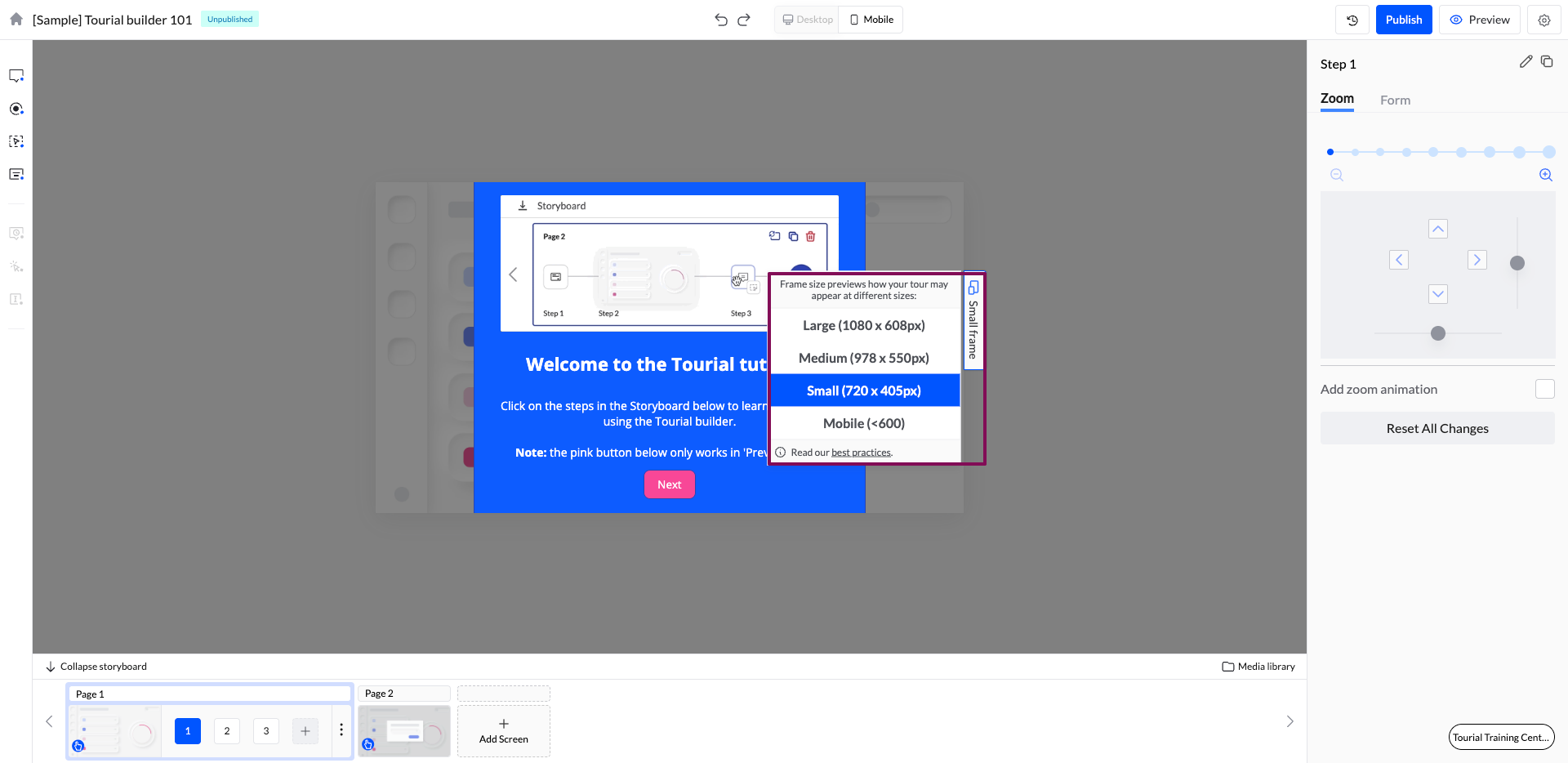
Treat the frame size previewer as a QA Tool that we can use to make sure the tour looks and feels great at all screen sizes for all buyers.
Not seeing the options for Medium and/or Large Frame? This likely means that the screen you're viewing the Tour on doesn't have enough space to display the larger versions of the tour.
When building your tours, it is important to test all screens at all sizes to make sure that every one of your buyers has a great experience.
***Note:** When embedding your tours on your website, most visitors will see the "Medium" sized version of the tour. When sharing the URL for the tour page, most visitors will be viewing the large version of the tour. Small sizes are the least viewed version and are typically accessed by a shrunken browser window or an iPad Mini (or similarly small screen size that doesn't allow the Tour to display a larger version.)*
Tip: If you intend to primarily share your tour on small devices or through a small embed , we recommend setting your tour to a smaller frame size before you start building.
---
# Agent Instructions
This documentation is published with GitBook. GitBook is the documentation platform designed so that both humans and AI agents can read, navigate, and reason over technical content effectively. Learn more at gitbook.com.
## Querying This Documentation
If you need additional information that is not directly available in this page, you can query the documentation by asking a question.
Perform an HTTP GET request on the following URL with the `ask` and `goal` query parameters:
```
GET https://docs.navless.ai/building-interactive-demos/interactive-tours/edit.md?ask=&goal=
```
`ask` is the immediate question: it should be specific, self-contained, and written in natural language.
`goal` is what the user is ultimately trying to achieve, the reason they need the answer. Sharing it helps GitBook give you a better, more relevant answer. A goal is most helpful when it describes the outcome the user wants rather than restating the question. For example, with `ask=how do I create an API token`, a goal like `automate deployments from our CI pipeline` lets GitBook tailor the answer to that use case.
The response will contain a direct answer to the question and relevant excerpts and sources from the documentation.
Use this mechanism when the answer is not explicitly present in the current page, you need clarification or additional context, or you want to retrieve related documentation sections.