> For the complete documentation index, see [llms.txt](https://docs.navless.ai/llms.txt). Markdown versions of documentation pages are available by appending `.md` to page URLs; this page is available as [Markdown](https://docs.navless.ai/analytics/tour-analytics.md).
# Tour Analytics
👉 [Take the Analytics Tour](https://websitetours.tourial.com/pages/tourial-analytics)
The Analytics page provides a single place for you to review and understand how your prospects are engaging with any of your live Tourials.
You can access this data from any device to see how visitors are interacting with your Tourials. These insights can shed light on buyer intent levels, show you which parts of your Tourials they're finding most interesting, and how effective your Tourials are in driving conversions.
First, click Analytics in the left-hand menu to view performance for all of your Tourials.
\

### Analytics Overview Page
Selecting Analytics will open your Overview page with aggregate data based on a selected date range. You can also split the data using the Device and Status dropdowns
* Total loads - total impressions (page loads) within a selected date range for all Tours - regardless of visitor engagement (hover/clicks)
* Total sessions - total number of times someone has clicked into any Tour or hovered over an element that triggers an action (showing they actually engaged with it)
* Total unique viewers - total number of unique individuals who have started sessions
* Total conversions - total number of form conversions across all Tours
**Sessions Timeline**\
Compare total loads, sessions, and unique viewers across a selected timeframe. You can also arrange the data using the dropdown for Daily, Weekly, or Monthly views
**Tour Table**\
See a list of your individual tours along with several data points including Loads, Sessions, Unique viewers, Conversions, and Avg. completion rate. Selecting the arrow will open the individual tour's analytics page
**Traffic Source**\
See where traffic is coming from across all your Tours (these categories are grouped by referring URLs) and sort by aggregated Loads, Sessions, or New visitors.
\
**Direct** - traffic with no known referrer (i.e. directly going to *tours.acme.com*)
**Email** - traffic from a link within an email/email campaign (i.e. link tagged with email param)
**Referral** - traffic from another source/referring URL (i.e. partner pages or marketplaces)
**Search** - organic and paid traffic from any search engine (i.e. Google or Bing)
**Social** - organic and paid traffic from any social network (i.e. LinkedIn or Facebook)\
\

👉 Note - While these sources are listed alphabetically, Tourial matches your traffic to a source by checking referring URLs in the below order (and it can only match 1):
Email > Social > Search > Direct > Referral
**Traffic by Device**\
Compare tour loads between desktop and mobile traffic within a selected date range
*Pro Tip: If your mobile traffic is higher than 10%, consider building a mobile version of your Tourial.*
### Individual Tour Analytics
Selecting a Tour opens your Analytics specific to that tour only, based on a selected date range. Similar to the overview page, you can add filters using the Device or URL dropdown.
* Loads - # of impressions (page loads) regardless of visitor engagement (hover/clicks)
* Sessions - # of times someone has clicked into a Tourial or hovered over an element that triggers an action (showing they actually engaged with it)
* Unique Viewers - # of individual people who have started a Tour session
*Pro tip: If the number of Sessions roughly matches the number of Unique Viewers, then it's likely most visitors are engaging with the Tourial only once. If Sessions are a lot higher than Unique Viewers, they're likely engaging with a tour multiple times.*
* Average completion - the average rate of completion for a tour (calculated by number of steps completed/total number of steps in a tour)
* Average session time - average length of a Tourial session in seconds
* Form conversions - total form submissions divided by total sessions
* Click through rate - CTA clicks (external links & forms) divided by sessions
**Engagement by Screens and Step**
* Sessions - Count of total sessions and unique sessions
* Avg. time - average time in seconds for that screen
* CTA clicks - count of external link clicks and form views/triggers
* Form submits - number of forms submitted (for screens that have a form on them)
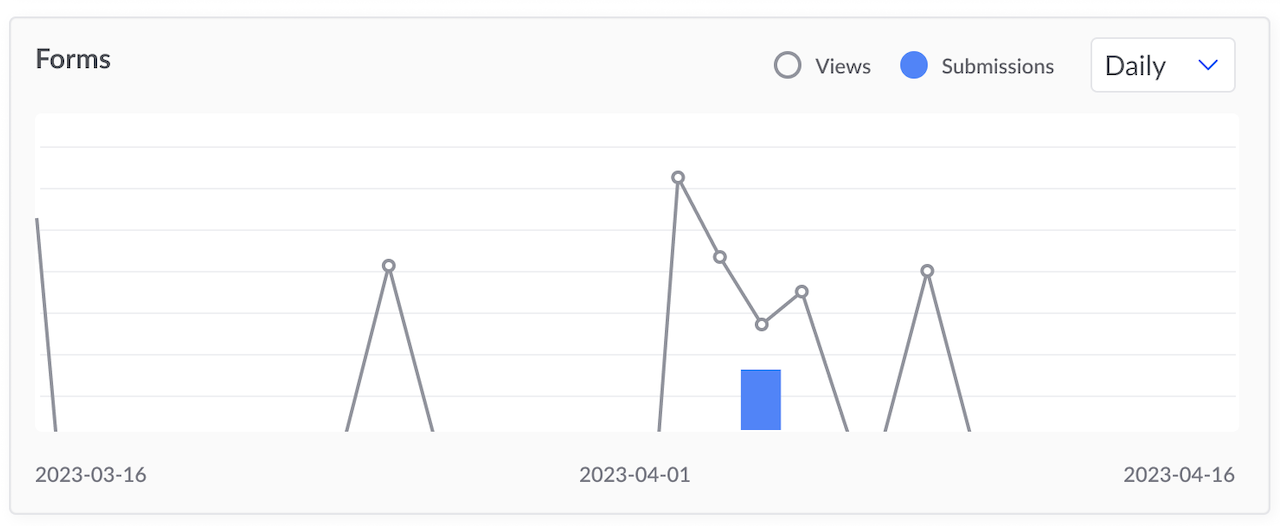
**Forms Timeline**
Compare form views and submissions across a selected timeframe. You can also arrange the data using the dropdown for Daily, Weekly, or Monthly views.
**Engagement by CTAs**
Shows how visitors are interacting with your CTAs and Forms.\

At the bottom, you'll see the same Traffic by Source and Device type charts for that tour.
***
### The Analytics page helps you Understand, Optimize and Validate.
#### UNDERSTAND
By seeing metrics on session time, traffic sources, they can see how buyers are getting to their tours and which ones they are investing the most time in and converting. Then you can make better decisions about which channels to focus and where your buyers typically are.
#### OPTIMIZE
With a better understanding of how your buyers are interacting, you can optimize your Tours and ensure they're being implemented and shared the best way across your go-to-market team.
* Tourials that are too long and complex can be simplified or broken into segments to be more effective with unique audiences or during specific stages of the buying journey.
* When buyers are getting stuck or dropping off in a single place, that part of the story can be improved upon (or removed) to keep them engaged.
* You can review engagement data to tailor tours for each use case.
#### VALIDATE
Use analytics to validate success of these three concerns:
1. The success of your optimization decisions.
2. The success of different types of Tours across various use cases.
3. The success of your Product Tour Marketing strategy with Tourial.
---
# Agent Instructions
This documentation is published with GitBook. GitBook is the documentation platform designed so that both humans and AI agents can read, navigate, and reason over technical content effectively. Learn more at gitbook.com.
## Querying This Documentation
If you need additional information that is not directly available in this page, you can query the documentation dynamically by asking a question.
Perform an HTTP GET request on the current page URL with the `ask` query parameter, and the optional `goal` query parameter:
```
GET https://docs.navless.ai/analytics/tour-analytics.md?ask=&goal=
```
`ask` is the immediate question: it should be specific, self-contained, and written in natural language.
`goal` is optional and describes the broader end goal you are ultimately trying to accomplish on behalf of the user. GitBook uses it to tailor the answer towards what is most useful for that goal.
The response will contain a direct answer to the question and relevant excerpts and sources from the documentation.
Use this mechanism when the answer is not explicitly present in the current page, you need clarification or additional context, or you want to retrieve related documentation sections.